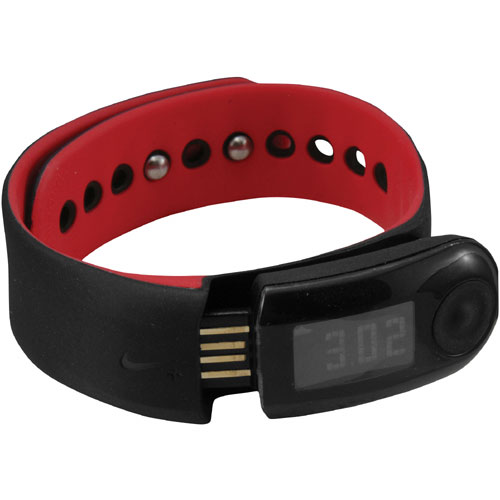
I admit that the road has been a rocky one, with this device. It has been a love/hate relationship. The latest round of drama has spawned from a faulty display on my sensor link. For a couple of months, I have only been able to read the first number, on the LCD display. Annoying as it was, I kept using it like that. Recently I purchased new shoes. As I have been breaking them in, I have had some random stretches in my runs where I was clocking 13 minute miles. ??????? It was also shorting me on distance. So today I was fed up and decided to call Nike to see what they could do for me.
First of all, Nike, I don’t know where you dig up your customer service reps… But, way to go! Each and every time that I have dealt with someone on the phone at Nike, I feel like I’m talking to Justin Long’s character in Dodge Ball. Collin, The rep that I dealt with today, is fluent in English, super nice, mellow, non-confrontational and everything else that you would hope for in these types of situations.
It turns out, that the issue with the display has actually been so common, that they have discontinued the current model and pulled it from all of the retail locations. A newer version will become available this summer. As a result, Nike is sending me a replacement band, so that I can at least see the display, to use until the new model comes out. When the new model comes out, I will be able to trade up for free. I was pretty stoked upon getting this news.
When I raised the issue I was having with the accuracy, he asked me if I was using the Nike shoes that were designed for the product. I admitted that I wasn’t. Despite this, Collin advised me as to how I could maximize the accuracy using the aftermarket lace pouch. Nice! I thought that I was going to have to buy a new chip. He also said that I should calibrate it about once a month because when I get faster or slower, it can throw off the accuracy. All super useful information.
To top it all of, I received this helpful email on linking my new sport band to my current account:
Hi Jacob,
It was a pleasure to speak with you over the phone today. I’m happy that you decided to continue the Nike+ experience with a new SportBand.
Here are the steps for link the Nike+ SportBand to your current Nike+ account. This process is real quick and easy.
The key is if you see “pending” or “guest” in the User Tab we need to replace this and assign your email address into this field.
– After installing the Nike+ Utility at www.nikeplus.com/downloads
– Please logout of your Nike+ account
– Then dock the link to the USB port and the Utility will popup you need to look at the desktop
– Please minimize all your Internet browsers or open programs
– Then click on the <i> in the bottom right corner of the Utility
– In the User Tab click on Login at the top
– A new browser will open and login with your current account info
– Then minimize the browser and click on done in the Utility and then undock and re-dock the link to the USB port and click on the <i> you should see your account info.I hope this information helps. Please feel free to call me at 800-379-6453 option 3 if you need more assistance. Here at Nike+ we are happy to help.
Collin
Nike+/Nike Running
Thanks again, Collin, and Nike.
Comments
One response to “Product Endorsement (Nike Plus)”
I have the same relationship with my Nike+ I ran today and yesterday and when I went to upload my runs it didn’t work. I got a Garmin watch for my B-Day/ Christmas it is better at tracking the miles but not as user friendly website.